Dimensions · a worked decision sheet
Research and Conference Poster Sizes Explained
A named paper size, the available display space, your PDF page and the final physical print describe different things. Identify which one a dimension refers to before setting up your poster or ordering a print.
| Size reference | Where it comes from | Question to resolve |
|---|---|---|
| Paper or poster-size reference | A named size, such as A0. | Is this a reference size or a requirement for your event? |
| Display board | Current organizer instructions. | Is this usable poster area or the surrounding board? |
| PDF canvas | Your source document and exported PDF. | Which page box and rotation describe the intended artwork? |
| Final print | Your order and printer confirmation. | Will it be printed at 100%, fitted or cropped? |
Use these as archived examples only
Before applying a size, verify the event, year and session against the relevant current official source. Confirm printer instructions and any permitted scaling separately; these archived examples do not establish current rules.
CVPR 2026: archived size and scaling choices
The 2026 CVPR main/Findings archive lists 84 × 42 inches and permits a 42 × 21 inch half-size input. Its workshop archive lists 42 × 21 inches. Source-permitted scaling means a nominal input mismatch is not automatically a rejection. Read the applicable profile and its exception together.
42 × 21 in · same 2:1 ratio
A0 and A1: reference sizes and archived UAB context
For the archived UAB profile, A0 is 841 × 1189 mm; landscape is also permitted and portrait is advisory. A1 at 594 × 841 mm is a different intended final size. The supplied educational layout uses A0 portrait solely as an example.
| Paper size | Millimeters (mm) | Approximate inches (in) |
|---|---|---|
| A0 | 841 × 1189 | 33.11 × 46.81 |
| A1 | 594 × 841 | 23.39 × 33.11 |
Inches are approximate conversions from millimeters using 25.4 mm per inch, rounded to two decimal places. Dimensions are portrait width × height; changing orientation can reverse the display order. These are reference paper sizes, not universal conference requirements. Confirm current organizer instructions, usable board area, intended PDF canvas and final printer output separately.
Is A0 the same as a 36 × 48 inch poster?
No. A0 portrait is 841 × 1189 mm, approximately 33.11 inches wide and 46.81 inches high. A portrait poster that is 36 inches wide and 48 inches high measures 914.4 × 1219.2 mm. Its proportions also differ from A0, so changing the file name or choosing “fit” does not make the two layouts interchangeable.
Here, dimensions always mean width × height. A 48-inch-wide, 36-inch-high landscape poster is a different orientation. Check your organizer’s convention: an unlabeled “36 × 48” may not tell you which side is horizontal.
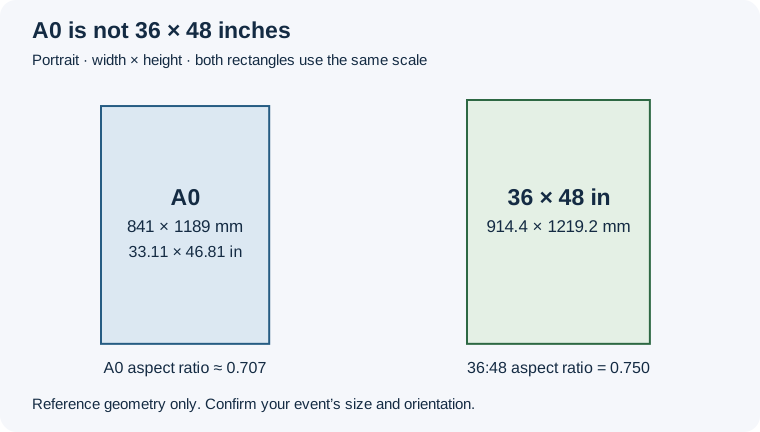
Worked example: keeping an A0 layout in proportion
Suppose your organizer accepts a 36-inch-wide, 48-inch-high output and your printer agrees to fit the whole A0 layout without cropping. At a height of 48 inches, the proportional artwork width is:
48 × 841 ÷ 1189 ≈ 33.95 inches.
Centered on a 36-inch-wide sheet, that leaves about 1.02 inches on each side. This calculation assumes the complete A0 page is the artwork boundary, with no extra crop, bleed or printer adjustment. It does not prove that margins are permitted or that image detail will survive enlargement.
If the design must reach a different aspect ratio, revise the source layout rather than stretching it unevenly. Agree the final canvas, cropping and scaling with the organizer and printer, then export a new PDF. Use the PDF Checker for supported page measurements and the print handoff checklist for unresolved production settings. Neither a dimension match nor this diagram certifies image sharpness or print success.
Reference dimensions: UCL’s poster size guidance. Event requirements vary even within an institution; see the separate symposium instructions in UNH’s poster guidance. Consult the current instructions for your own event.
A worked scaling calculation
A 42 × 21 inch file enlarged uniformly by 2 becomes 84 × 42 inches. Both sides change by the same factor; the ratio stays 2:1. This arithmetic explains a possibility, not a printer instruction or a claim that the file’s artwork will remain sharp. Confirm the actual scaling path before ordering.
The PDF dimensions describe the input file. Agreed scaling can change the final physical print dimensions, so a difference between them is not automatically a file error.
When PDF size and intended output differ
- Compare width, height, units, orientation and the relevant page box with the intended final output. Keep board dimensions separate.
- If scaling is permitted, agree the final size and uniform scale with the printer. Do not assume that fitting or cropping will preserve the intended result.
- If scaling is not intended, correct the source canvas or export settings as needed, export again and check the new PDF. If permission or intended output is unclear, ask the organizer or printer before proceeding.
What the local measurement does
- Normalize page rotation and PDF UserUnit into physical dimensions.
- Compare the single-page measurement with the selected archived rule using the inherited numerical tolerance of 0.05 PDF points. This is a serialization tolerance, not a print-production allowance.
- Return UNKNOWN when page boxes disagree, parsers disagree or intended output cannot be established.
- Keep current applicability separate from a dimension match.
Carry these notes into the checker
Write “intended width ___; height ___; orientation ___; print scale ___; source URL ___; checked date ___; exception ___.” If any field comes from assumption, mark it as such. Re-exporting or changing your declaration requires another check.
Use the PDF Checker to read supported PDF facts without selecting an event. Review RISK or UNKNOWN results and unresolved print settings with the relevant source or printer. The checker does not establish actual printed dimensions, effective image DPI, color certification or universal conference compliance.
Read the archived source profiles →Check your PDF size
Read measured page dimensions without selecting an event.
Check your PDF size →